It is the worst feeling in marketing.
You launch a new Facebook or Google campaign. For the first 48 hours, it’s a winner. Clicks are cheap, sales are coming in. You feel like a genius.
Then, Day 3 hits. The Cost Per Click (CPC) spikes. The sales stop. You leave the ad running for two more days, hoping it will “optimize,” but it just burns through your credit card.
You are suffering from “Creative Fatigue.”
In 2026, the Facebook and TikTok algorithms eat content for breakfast. If you show the same image to the same audience three times, they ignore it. To win, you don’t need better targeting; you need more creative volume.
But hiring a designer to make 50 new ads a week costs a fortune.
This is where AI becomes your “Unlimited Creative Studio.” In this guide, I will show you how to generate high-converting, “Scroll-Stopping” ad creatives in minutes—often for free—so you never run out of ammo again.
Table of Contents
The “Creative Factory”: A 3-Step AI Workflow
Stop staring at a blank Canva canvas. Use this assembly line to churn out winning ads.
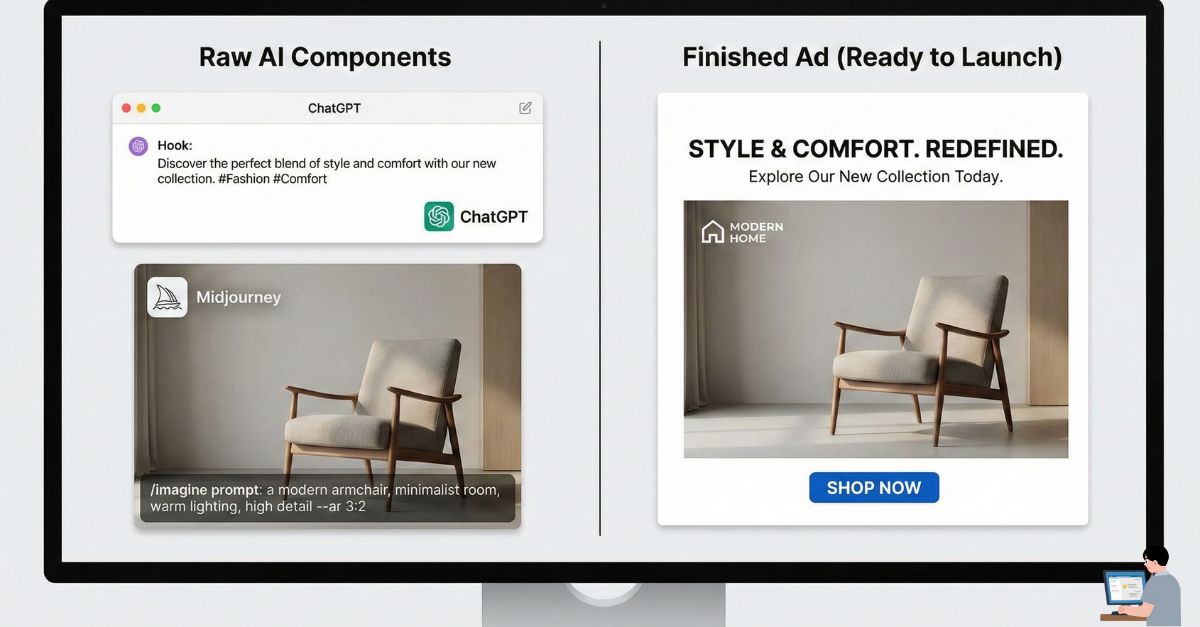
Step 1: The “Hook” Generator (ChatGPT)
Most ads fail because the text is boring. You need a “Hook”—the first sentence that grabs attention.
Copy This Prompt (The P-A-S Framework):
“I am selling [Product Name] to [Target Audience].
Write 5 Facebook Ad Hooks using the ‘Pain-Agitate-Solution’ framework.
Constraint: The first sentence must be under 7 words and controversial or surprising.
Format: Focus on the specific pain point of [Insert Pain Point, e.g., ‘Wasting money on ads’].”
Step 2: The Visual Generator (Midjourney / Canva)
You need an image that pops. You have two paths here:
- The Free Way: Use Canva’s “Magic Media” tool. Type “A neon blue running shoe splashing in a puddle, cinematic lighting” and it generates a unique image for free.
- The Pro Way: Use Midjourney (Discord) for photo-realistic results that look like a $5,000 photoshoot.
Step 3: The Assembly (AdCreative.ai vs. Alternatives)
Now you need to put the text on the image with a “Shop Now” button.
| Feature | AdCreative.ai (Paid) | Canva Bulk Create (Free) |
| Best For | Speed & Data | Control & Budget |
| How it Works | AI places the text/button exactly where eye-tracking data says people click. | You design one template, and AI fills it with 50 different hooks instantly. |
| Output | 100+ variations in 30 seconds. | Unlimited variations (Manual setup required). |
The “Cyborg Method” (Personalization Tip)
This is the secret to not looking like a scammer.
The problem with pure AI ads is they can look too perfect (and fake). Users scroll past “stock photos.”
The Tip: Do not let AI generate the product itself.
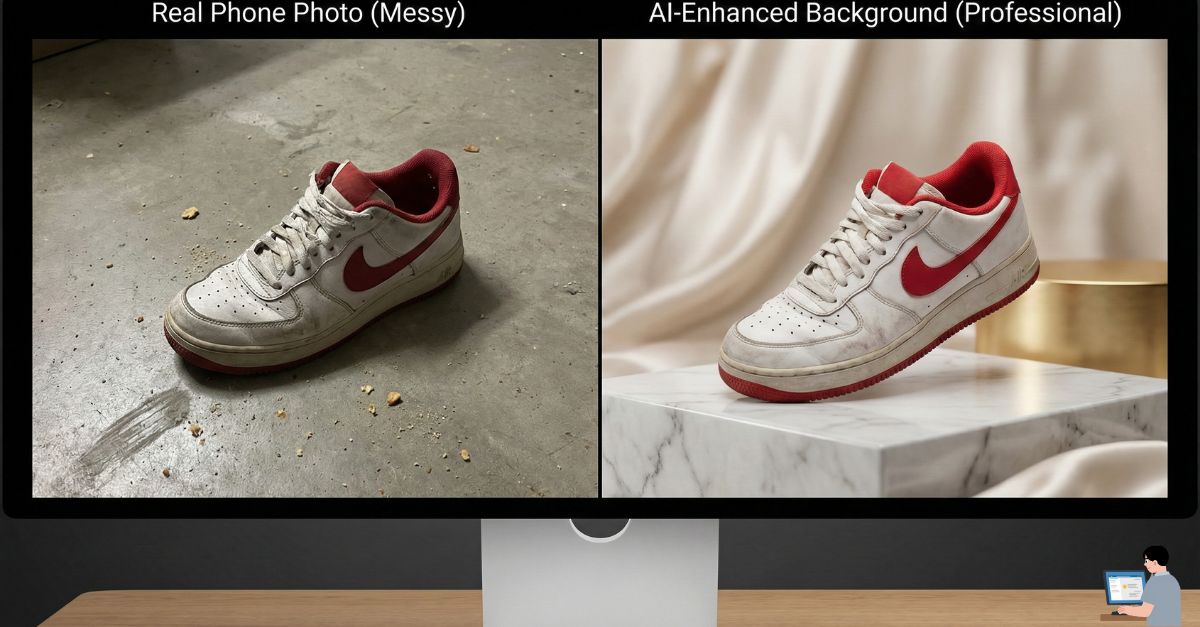
- Take a photo of your product (or yourself) with your phone. It can be messy.
- Use AI to “Clean” it. Upload it to Photoroom or Canva Magic Edit.
- The Prompt: “Keep the product, but change the background to a luxury marble kitchen counter.”
Why this works: The product looks real (human trust), but the environment looks expensive (AI polish). It’s the perfect hybrid.
Strategy: Budgeting & The 70/20/10 Rule
Now that you have 50 AI ads, how do you spend your money? Don’t gamble it all.
- 70% of Budget: Spend on “Proven Winners.” These are the boring ads that you know make money.
- 20% of Budget: Spend on “Safe Bets.” These are new variations of your winners (e.g., same image, different headline).
- 10% of Budget: Spend on “Moonshots.” This is where you test your crazy AI ideas (e.g., a weird meme or a totally different angle). Most will fail, but one might be a viral unicorn.
Watch the Workflow (Video Tutorial)
Want to see how to build these ads inside Canva using AI? Watch this step-by-step breakdown:
[EMBED YOUTUBE VIDEO HERE: https://www.youtube.com/watch?v=sO7sylX59eQ]
(Video Title: How to Create Bulk Social Media Content with Canva AI)
FAQ: Real Questions, Real Answers
Q: How do I stop ads on Fire? (Burning Budget)
A: If an ad is burning cash, kill it. Use the “3x Rule”: If an ad spends 3x your target Cost Per Acquisition (CPA) without a sale, turn it off immediately. Don’t let emotion keep a loser running.
Q: How to fix “Limited by Budget” in Google Ads?
A: This means your ads are good, but you ran out of money too early in the day.
- Lower your Bid (CPC): You will get cheaper clicks and stay live longer.
- Tighten your targeting: Stop showing ads to the whole country; focus only on your top 3 cities.
Q: Is $10 a day enough for Facebook ads?
A: Yes, IF you are testing.
- Use $10/day to test one creative against a broad audience for 3 days ($30 total).
- If it gets no sales, kill it. If it gets sales, scale it to $20/day.
- Warning: Do not try to test 10 different ads with $10. You need at least 500-1,000 impressions per ad to know if it works.
Q: Is it legal to use AI to generate ads?
A: Yes. You own the copyright to images generated by paid tools like Midjourney or Canva. However, never use AI to generate images of celebrities or copyrighted characters (like Mickey Mouse) in your ads. That will get you sued.
Final Verdict: Volume Wins
The days of spending $500 on a single “Perfect Ad” are over.
The winners in 2026 are the marketers who can test 20 “Good Enough” ads every week to find the one diamond. AI is the only way to do that without going broke.
Your Action Plan:
- Use ChatGPT to write 10 Hooks.
- Use Canva Magic to make 10 Backgrounds.
- Use the “Cyborg Method” to add your real product.
- Launch them at $10/day using the 70/20/10 rule.
Stop burning budget. Start testing creative.