It happens every Monday morning.
A new employee pings you on Slack: “Hey, where can I find the 2026 holiday calendar?”
Ten minutes later, another ping: “What is our policy on remote work expenses?”
You spend 30% of your week acting as a human search engine, copy-pasting answers from PDFs that nobody reads.
You wish you could just tell them, “Ask ChatGPT.” But you can’t. Uploading your private company handbook to a public AI model is a massive security risk.
The solution? Build a Private AI.
In 2026, you can build a secure, private chatbot that answers questions based only on your internal documents—without knowing how to code.
In this guide, I will show you how to clone yourself into a “Policy Bot” that answers questions 24/7, keeping your data safe and your sanity intact.
Table of Contents
The Danger: Why You Can’t Use Public ChatGPT
If you upload your “Employee Handbook” or “Sales Strategy” to the free version of ChatGPT, you are potentially giving that data to OpenAI to train their future models.
The “Samsung Rule”:
In 2023, engineers at Samsung pasted proprietary code into the free version of ChatGPT to fix a bug. That code was uploaded to the public database, causing a massive security leak.
The Lesson: Never put confidential data into a free, public model. You need a “Walled Garden”—an AI that lives on a private server and deletes your data after processing.
The Solution: What is “Private AI”?
A Private AI uses a technology called RAG (Retrieval-Augmented Generation).
Think of it like a Digital Librarian:
- Upload: You give the AI your PDFs (Policies, SOPs, Benefits).
- Index: The AI reads and organizes them.
- Answer: When an employee asks “Can I expense a client dinner?”, the AI searches only your documents, finds the specific paragraph, and writes an answer citing the source.
It does not use the public internet to answer, so it won’t “hallucinate” fake facts.
Step-by-Step: How to Build Your Bot (No-Code)
You don’t need a developer. You can use “Wrapper Tools” like Chatbase or Dante AI. Here is the workflow:
Step 1: Gather Your “Truth”
Collect your PDFs. Common ones include:
- Employee Handbook
- IT Security Policy
- Sales Scripts
- Pricing Sheets
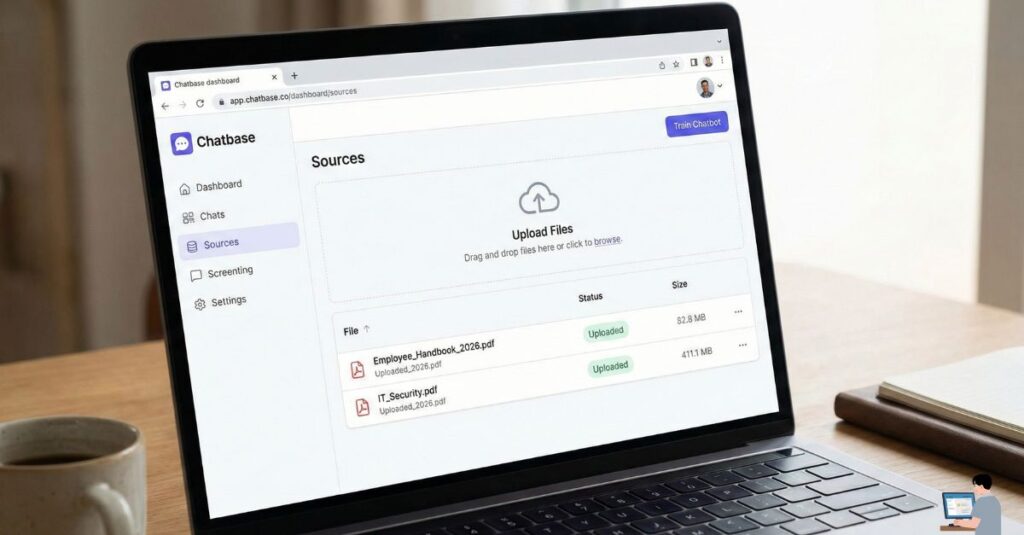
Step 2: Upload to a “Wrapper” Tool
- Go to a site like Chatbase.co.
- Click “New Chatbot”.
- Drag and drop your PDF files into the upload box.
Step 3: Test and Embed
The AI will train in about 30 seconds. Now, ask it a question:
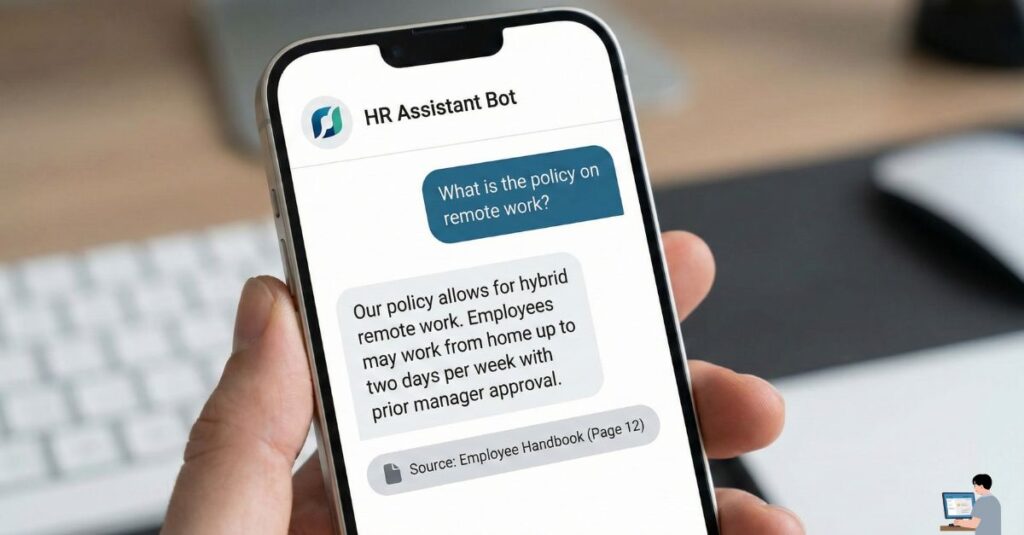
“What is the maternity leave policy?”
It should answer instantly and provide a link to the exact page in the PDF where it found the answer.
- Embed it: Copy the “iframe” code and paste it onto your internal company Notion, SharePoint, or Slack channel.
Comparison: Custom Bot vs. Microsoft Copilot
Many companies ask: “Why build a custom bot if we have Microsoft 365?”
Here is the breakdown for 2026:
| Feature | Custom Bot (Chatbase/Dante) | Microsoft Copilot Studio |
| Cost | Low ($20-$50/mo total) | High ($30/user/mo) |
| Setup Time | 5 Minutes | Weeks (Requires IT Admin) |
| Best For | Specific Teams (e.g., HR Bot, Sales Bot) | Enterprise Wide (Search everything) |
| Control | High (You choose exactly what PDFs it reads) | Low (It searches all files you have access to) |
Verdict: Use Chatbase for a quick, specific “HR Answer Bot.” Use Copilot if you want to search your entire email history and OneDrive.
Bonus: Free AI Policy Template
Before you give employees AI tools, you need rules. Copy this policy to protect your business.
Copy This Policy:
[Company Name] Acceptable AI Use Policy (2026)
1. Purpose: To ensure the safe and productive use of AI tools at work.
2. Approved Tools:
- Green List (Safe): [Insert your Private Bot Name], Grammarly Business.
- Red List (Unsafe): Public ChatGPT (Free Version), Personal AI Apps.
3. Data Privacy:
- NEVER input PII (Personally Identifiable Information), client names, or financial codes into any AI tool.
- Assume Public: Treat every prompt as if it were a public Facebook post.
4. Verification:
- AI makes mistakes. You are responsible for fact-checking all AI-generated work before sending it to a client.
Video Insight: Building a Bot in 5 Minutes
Want to see exactly how to upload your PDFs and create this bot? Watch this tutorial on building a custom AI knowledge base without writing a single line of code.
(Video Title: How to Create a Custom AI Chatbot with Your Own Data)
FAQ: Real User Queries Answered
Q: Is there a free AI policy generator?
A: Yes. Sites like Termly and Workable offer free “Acceptable Use Policy” generators. You just answer a few questions about your company size, and they email you a PDF.
Q: Can I run a private AI on my laptop (Offline)?
A: Yes, if you are tech-savvy. You can use PrivateGPT (from GitHub) or LM Studio. These tools download the AI model to your computer so it runs 100% offline. No data ever leaves your device.
Q: What is “Venice.ai”?
A: Venice.ai is a privacy-focused AI popular in 2026 for its “Zero Logging” policy. It does not store your chats on their servers. It is great for personal privacy, but for team documents, Chatbase is easier to manage.
Final Verdict: Automate the Boring Stuff
You didn’t start a business to repeat yourself 50 times a day.
By spending one hour building a Private AI, you create a “Source of Truth” that never sleeps, never complains, and never gives the wrong answer.
Action Plan:
- Gather your policy PDFs.
- Upload them to Chatbase (easiest start).
- Embed the bot in your Slack.
- Enjoy your silence.