If you aren’t posting Reels, TikToks, or YouTube Shorts, your business basically doesn’t exist. But here is the problem: Video editing is hard.
You either have to learn complex software like Adobe Premiere Pro, or you have to pay an agency $500 per video. I didn’t want to do either.
I wanted to find a Free AI ad video generator that could take a simple text script and turn it into a high-converting video ad automatically.
So, I did what everyone does—I searched for “Free AI ad generator Reddit” threads to see what real users were recommending. Then, I spent the last week testing the 5 most popular tools myself.
I looked for three specific things:
- No Watermark: (Non-negotiable).
- Real AI Generation: (Not just a template editor).
- Viral Quality: (Does it look like a human made it?).
The results were shocking. Most tools failed, but one “viral app” is secretly the best free AI ad generator on the market.
The “Watermark Trap” (Tools I Rejected)
Before I show you the winners, I need to warn you about the “Fake Free” tools. These tools are often recommended by affiliates, but they are useless for a $0 budget campaign.
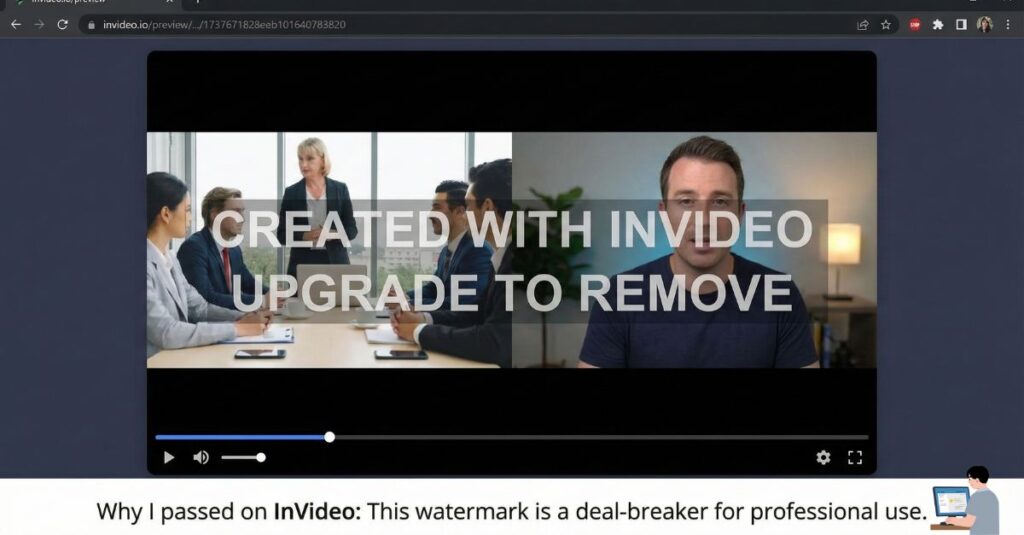
- InVideo AI: You will see this tool recommended everywhere. And honestly? It is amazing. But the free version plasters a giant watermark across the screen. You cannot use it for ads unless you pay.
- HeyGen: Incredible for AI avatars, but the free trial is extremely limited. Great tech, but useless for a “free forever” strategy.
The Top 3 Free Video Ad Generators
After filtering out the watermarks, I was left with three tools that actually let you publish for free.
#3: Microsoft Clipchamp (The Safe Choice)
Best For: Corporate Videos & LinkedIn Ads.
Most people don’t know that Microsoft Clipchamp (which comes pre-installed on many PCs) now has a button called “Create a Video with AI.”
My Test Results: I uploaded 5 photos of a “Real Estate Property” and gave it the title “Luxury Apartment in Islamabad.”
- Speed: It took about 30 seconds.
- Output: It automatically synced the photos to a “House” music beat, added smooth transitions, and even suggested a font that looked professional.
The Verdict: It’s a solid AI video ad generator for safe, corporate content. It is clean and professional, but it likely won’t go viral on TikTok.
#2: Canva “Magic Design for Video”
Best For: Instagram Stories & Product Teasers.
Canva is reliable. If you already use it for images, you should try their “Magic Design for Video” feature.
My Test Results: I typed the prompt: “An energetic 15-second promo video for a new gym opening, fast music, motivational vibe.”
- The Magic: It pulled stock videos from its library and matched them to a high-energy song.
- The Best Part: It automatically added text overlays that matched the music beat.
Important Warning: If you want a free video without a watermark, you must stick to Canva’s “Free” stock footage. If you accidentally use a “Pro” clip (marked with a crown icon), you won’t be able to download it without paying.
#1: The Winner – CapCut “Script to Video” (The Viral Cheat Code)
Best For: TikTok, Reels, & High-Conversion Ads.
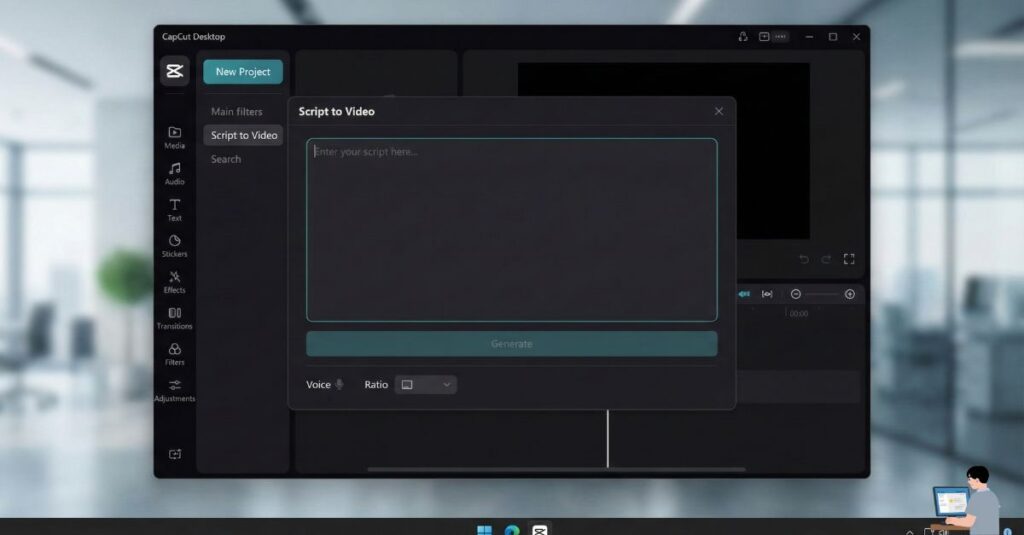
This is the tool agencies don’t want you to know about. CapCut offers a feature called “Script to Video” (available on Desktop and Mobile) that is a game-changer.
My Live Test (The Workflow):
- The Input: I opened the tool and selected “Tech/Gadgets.”
- The Script: I typed: “Stop charging your phone 3 times a day. Meet the new SolarBank power bank. It charges with the sun. Get yours today.”
- The Magic: CapCut didn’t just put text on a screen.
- It found stock footage of people looking frustrated with low battery.
- It added an AI Voiceover (that actually sounds human).
- It auto-captioned the spoken words.
Why it Wins:
- Commercial Quality: It looks exactly like the ads you see on your “For You” page.
- 100% Free Export: It is currently the only high-quality AI video generator without a watermark that doesn’t restrict you heavily.
[INSERT IMAGE HERE] Placement: Screenshot of the CapCut “Script to Video” interface showing the text input box. Caption: CapCut’s interface allows you to type a simple script and generates a video in seconds.
Step-by-Step: How to Create Your First AI Ad in CapCut (5 Minutes)
Since CapCut is the clear winner, here is exactly how to use it to generate a free video ad today.
Step 1: Access the “Script to Video” Tool Open the CapCut desktop app or go to the online dashboard. Look for the button labeled “Script to Video” (sometimes located under the “Magic Tools” or “Commerce Pro” tab).
Step 2: Input Your Script (Or Let AI Write It) You have two choices:
- Write your own: Type your sales script manually for maximum control.
- Use AI Writer: Select “AI Writer,” choose a category (e.g., Games, Beauty, Tech), and type a simple prompt like “Sell a waterproof smartwatch.” The AI will generate a full script for you.
Step 3: Choose Your Platform Settings
- Aspect Ratio: Select 9:16 (Vertical) for TikTok/Reels or 16:9 (Horizontal) for YouTube.
- Voice: Choose a voiceover. Pro Tip: The “American Female – Energetic” voice usually performs best for ads.
Step 4: Click “Generate Video” Wait about 10–20 seconds. CapCut’s AI will analyze your text, search its massive stock library, and assemble a timeline with video clips, subtitles, and background music.
Step 5: The “Human Touch” Edit (Crucial) The AI gets it 90% right, but don’t just export yet. Watch the video. If one clip looks weird (e.g., a clip of a dog when you mentioned a cat), simply click the clip and hit “Replace.” Search for a better clip in the library. Once you are happy, click Export (1080p, No Watermark).
5 Rules for Making AI Ads That Actually Convert
Using an AI tool is easy, but making money with it requires strategy. Follow these 5 rules to stop your ads from looking like spam.
Rule #1: The 3-Second Hook is Everything AI often starts videos slowly. Delete the intro. Ensure the very first second of your video has movement or a bold statement.
- Bad: “Hello, today I want to talk about…”
- Good: “Stop wasting money on expensive headphones!”
Rule #2: Don’t Trust the Default Music AI generators often pick generic “elevator music.” Always swap the music track for something trending or high-energy. The music controls the emotion of the ad.
Rule #3: Short is Sweet The best performing AI ads are between 15 to 25 seconds. Anything longer than 30 seconds usually gets skipped. If the AI generates a 1-minute video, cut it in half.
Rule #4: Force the “Call to Action” (CTA) AI creates great content but often forgets to sell. Manually add a text overlay at the end that says exactly what to do:
- “Shop link in bio”
- “Get 50% off today”
- “Download now”
Rule #5: A/B Test Your Scripts The beauty of AI is speed. Don’t just make one ad. Generate three different versions with three different hooks (e.g., one funny, one serious, one problem-focused) and post all three. See which one gets the most views.
Frequently Asked Questions (People Also Ask)
Is there a Free AI ad generator with no sign-up? Honestly? No. Almost every legitimate AI tool requires you to create a free account to save your projects. However, tools like Microsoft Designer and CapCut allow you to sign in with existing Google or Microsoft accounts instantly, so you don’t need to create a new password.
What about AI Ad Generator Predis AI? Predis AI is often mentioned alongside tools like Canva. It is excellent because it generates carousels and videos specifically for social media.
- Is it free? Yes, it has a free plan (15 posts/month).
- Why didn’t it win? It puts a small watermark on the free plan video exports. However, if you are okay with a small logo, it is a very powerful alternative to Canva.
What is the best free AI ad generator for beginners? If you want images, use Microsoft Designer. If you want video, use CapCut. Both are free, have no watermarks, and are easy to use.
Conclusion: Which Tool Should You Use?
Stop overthinking video ads. You don’t need a camera, and you definitely don’t need to pay for expensive software.
- If you want a safe, corporate video, use Microsoft Clipchamp.
- If you want a viral, high-converting ad, use CapCut.
Your Turn: Go try the CapCut “Script to Video” feature today. Does it work for your niche? Let me know in the comments below!