
If you don’t have experience, every job application feels the same. You upload your resume. You hit submit. And… nothing happens.
Not because you’re not capable — but because employers can’t see what you can do.
That’s where a job-ready portfolio changes everything.
In this guide, I’ll show you how to build a professional portfolio step by step, even if you’ve never had a real job, a client, or a formal role before. No fluff. No fake projects. Just a clear system that actually works to get you hired.
What Is a Job-Ready Portfolio? (In Simple Words)
A job-ready portfolio is proof of skill, not proof of employment.
Unlike a resume, which lists where you worked, a portfolio shows:
- What you can do.
- How you think.
- How you solve problems.
The Important Part: A portfolio is not about being perfect. It’s about being clear and believable. That’s why portfolios often beat resumes — especially for beginners.
“No Experience” Is Not the Problem
The real problem is trust. Employers don’t trust claims; they trust evidence.
You can say:
- “I know graphic design.”
- “I’m learning web development.”
- “I’m good at writing.”
But without a portfolio, those are just words. A portfolio turns “I can do this” into “Here’s what I’ve already done.”
How to Create a Job Portfolio (The Beginner Strategy)
Let’s answer the first big question directly: How do I build a portfolio if I have no clients?
You don’t start with expensive tools. You start with one skill.
Examples of skills you can portfolio:
- Content Writing / Copywriting
- Graphic Design
- Video Editing
- Data Analysis
- UI/UX Design
- Web Development
- Social Media Marketing
Golden Rule: Your portfolio should focus on one direction. Don’t try to be a “Writer / Designer / Coder.” Employers hire specialists, not generalists. Clarity beats variety.
How to Build a Portfolio Step by Step
Follow this exact structure to build a portfolio that looks professional, even without paid work history.
Step 1: Choose One Specific Job Role
Do not position yourself as “doing anything online.” Choose a specific target:
- Good: “Junior Web Developer”
- Good: “SEO Content Writer”
- Bad: “I will do any computer work.”
Your portfolio must answer one question for the hiring manager: “Can this person do this specific job?”
Step 2: Create 3–5 Skill-Based “Practice Projects”
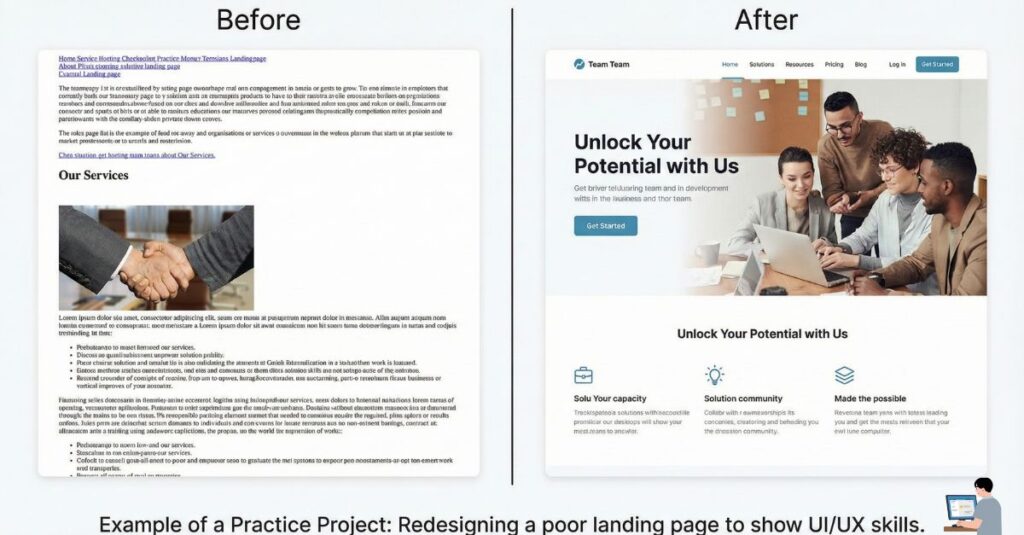
You do not need real clients to have real projects. You can create Practice Projects. These are unsolicited projects where you solve a real problem for a fake (or real) brand.
Ideas for Practice Projects:
- Redesign: Take a popular website or app and redesign one page to look better.
- Rewrite: Find a landing page with bad copy and rewrite it to be more persuasive.
- Mock Ads: Create a set of Instagram ads for a brand like Nike or Spotify.
- Demo App: Build a simple calculator or To-Do list app (for developers).
- Case Study: Analyze public data and create a visualization (for data analysts).
Employers accept these projects because they show your actual skill level.
Step 3: Explain the Process (This Is Critical)
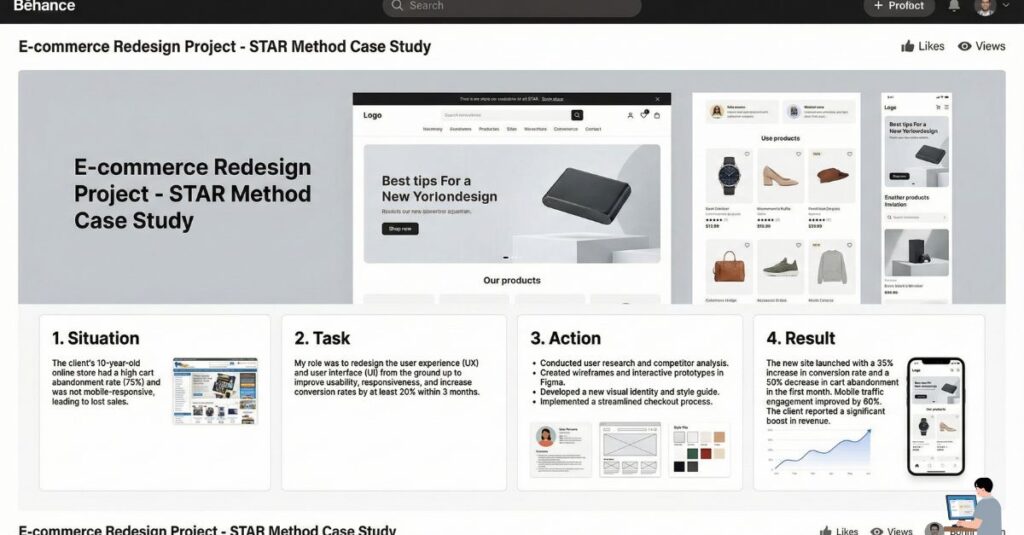
Do not just post a screenshot of the final result. That tells the employer nothing. For every project, write a short case study explaining:
- The Problem: What were you trying to fix or create?
- Your Approach: How did you plan it? Why did you make those decisions?
- The Tools: Did you use Photoshop? WordPress? Python? Figma?
- The Result: The final outcome.
This section shows your critical thinking, which is exactly what companies hire for.
Step 4: Write a Simple “About Me”
Keep this professional but personal. You don’t need a biography. Include:
- Who you are.
- The specific role you are looking for.
- What you are currently learning.
Tip: Honesty works better than exaggeration. It is okay to say, “I am a self-taught developer looking for my first junior role.”
Step 5: Add Contact + Availability
Make it incredibly easy to hire you. Must-haves:
- A professional email address (e.g.,
firstname.lastname@gmail.com). - A link to your LinkedIn profile.
- Links to GitHub, Behance, or Google Drive (depending on your industry).
How to Build a Job-Ready Portfolio Online (Free Tools)
You don’t need to spend money on an expensive website builder. A simple site that works is better than a fancy site that is hard to navigate.
Best Free & Cheap Options:
- WordPress: The industry standard. Great for long-term growth.
- Notion: The easiest, fastest way to build a clean portfolio page for free.
- GitHub Pages: The best standard for developers.
- Behance / Dribbble: Essential for graphic designers.
- Google Sites: Basic, but functional and free.
Focus on: Clean layout, fast loading speed, and mobile responsiveness.
Job-Ready Portfolio Template (Simple Structure)
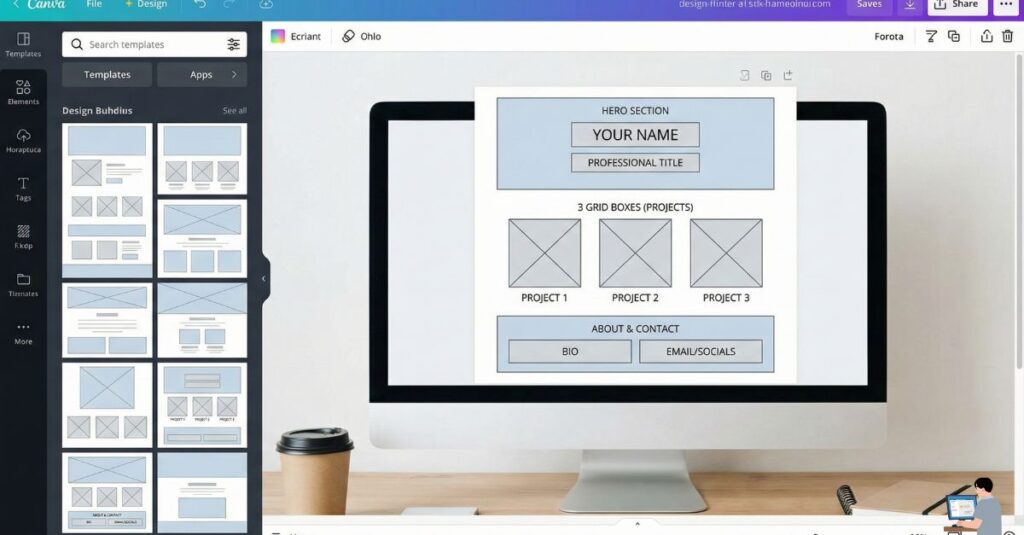
If you are building your site today, use this structure. It works for almost every industry.
1. Homepage
- Hero Section: Your Name + Job Title + One sentence value proposition.
- Call to Action: “View My Work” button.
2. Projects Section (The Core)
- Grid of 3–5 projects.
- Each project clicks through to a detailed “Case Study” page.
3. About Section
- Short bio.
- List of technical skills (Soft skills & Hard skills).
4. Contact Section
- “Ready to work? Email me at…”
Job-Ready Portfolio Examples (Beginner Level)
Here is exactly what you should put in your portfolio based on your role:
Example for a Content Writer:
- Project 1: A blog post rewrite (Show the “Before” text vs. your “After” text).
- Project 2: An SEO-optimized article sample about a trending topic.
- Project 3: Product descriptions for an imaginary e-commerce store.
Example for a Web Developer:
- Project 1: A landing page clone of a famous site (e.g., Netflix homepage).
- Project 2: A functional JavaScript tool (e.g., a currency converter).
- Project 3: A GitHub link to your code with a clear ReadMe file.
FAQs: Building a Portfolio Without Experience
Q: Do I need to buy a domain name (dot com) for my portfolio?
A: Not immediately. You can start with free platforms like Notion or GitHub Pages. However, buying a custom domain (like yourname.com) looks more professional and costs only about $12/year. It is a good investment once you are ready to apply for jobs.
Q: Can I put coursework or school projects in my portfolio?
A: Yes, but only if they are unique. If you built the exact same project as 500 other students in your bootcamp, it won’t stand out. Try to customize school projects—change the design, add a new feature, or use real data to make it your own.
Q: How many projects are “enough” to get hired?
A: Quality beats quantity. Three high-quality projects (where you explain your process clearly) are better than 10 mediocre ones. Aim for 3 solid projects that show different skills.
Q: What if I don’t have any results or data to show yet?
A: That is okay. If you don’t have data (like “increased sales by 20%”), focus on the process. Explain why you made certain decisions and what you learned. Employers hire juniors for their potential, not just their past numbers.
Final Advice (The Honest Truth)
You don’t build a portfolio after you get experience. You build a portfolio to get experience.
Most people wait for permission to start working. The winners start small, build practice projects, and show their work to the world. Start your portfolio today.